Suggest quantities based on historical demand
Supply Chain · Purchase
Suggest quantities based on historical demand
The Suggest feature allows users to quickly and automatically calculate push-based replenishment needs by recommending quantities to order based on historical demand.
Configuration
First, ensure that the Purchase, Inventory, and Sales apps are installed. Additionally, at least one delivery order must have been validated for each product to be considered for replenishment. This ensures there is a past delivery record the system can use to calculate average daily demand.
Similarly, a vendor must be added to the vendor pricelist with a purchase price for each product. The Suggest feature is vendor-specific, so each product needs a matching vendor for accurate purchase quantity and price calculations.
Finally, products to be used with the Suggest feature must have their Product Type set to Goods and be Tracked by quantity. This ensures the system can manage stock levels and calculate recommended replenishment quantities for tangible items.
Suggest replenishment quantities
To suggest quantities based on past sales, navigate to the app. Create a New RFQ or select an existing one.
In the RFQ, set the Vendor field to the chosen supplier. In the Products tab, click the Catalog button to view that vendor’s items.
Tip
By default, products listed in the product catalog are filtered by vendor. If products are missing, they may not be configured with the chosen vendor.
On the resulting page, toggle Suggest in the left sidebar to activate the feature. Two fields appear underneath the toggle while it’s active.
Replenish for: The duration (in days) from the current date that quantities are suggested for.
Based on: The period used to determine demand: forecasted, last 7 days, 30 days, 3 months, 12 months, or the same month or quarter the previous year. Additionally, the following percentage field defines the amount by which sales data is decreased or increased when suggesting replenishments (default 100%).
The total underneath these fields shows the order value to be added to the RFQ. Odoo calculates this figure by multiplying the vendor’s Unit Price by the suggested replenishment quantity.
Once the parameters are confirmed, click Add All to add all suggestions to the order. Then, click Back to Quotation to confirm the final numbers on the RFQ and adjust the amounts of products to purchase (if needed).
Example
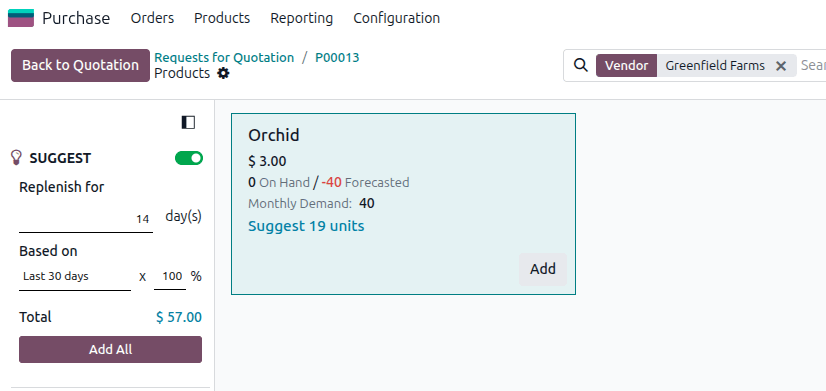
A company needs to replenish orchids for the next 14 days, referencing the last 30 days of historical data at 100% of sales. Within those 30 days, the company delivered 20 units of orchids 15 days ago and 20 units 1 day ago.
If the Suggest feature is used, the system recommends purchasing 19 orchids. Since the Unit Price for each orchid is $3, \($3 \times 19 = $57\), which is the total amount displayed.
How Odoo calculates demand
To estimate demand, Odoo sums all validated deliveries, components consumed in manufacturing orders (MOs), or components used to resupply subcontractors coming from the warehouse specified in the RFQ in the Based on period. The average daily demand is this sum of outgoing moves divided by the number of days in the Based on period, multiplied by the percentage. The estimated demand is the average daily demand multiplied by Replenish for days.
Note
Only Assigned or Confirmed moves are taken into account in the average daily demand calculations. Sales quotations or manufacturing orders in Draft are not taken into account until validated.
Tip
In a multi-warehouse setup, internal deliveries are also counted in demand estimation. In the case of a central warehouse dispatching products to individual stores, the average daily demand of the central warehouse includes internal transfers to individual stores.
To find the suggested replenishment quantity, Odoo deducts the estimated demand from the current stock available quantity and all incoming shipments.
Additional tips for usage
Suggested replenishments are based on validated delivery orders, manufacturing orders, and other inventory actions that consume quantities. For delivery orders, the Effective Date field is considered the date the quantities were consumed.
Be sure to regularly review and update vendor pricelists to reflect the latest pricing and supplier information to ensure correct suggestions.
Test sales projections based on seasonality. Reference prior months or quarters to capture seasonal fluctuations and experiment with the percentage to project sales.
Always review suggestions critically. Although the Suggest feature provides a baseline recommendation, keep in mind that market changes, sales promotions, and upcoming events can all affect actual demand.
Adapted from the Odoo 19.0 User Documentation for DigitsCode customer support. © Odoo S.A. DigitsCode capabilities remain in the DigitsCode Capabilities category.